Assigning User Roles
Menu > System > Users > User Roles
Use this page to assign roles to the selected user if you have the User Administrator role. For other users, this page is view-only.
A single user may have multiple roles attached to them, associated with one or more companies. For example, a user may have the Super User and Custom Authority Manager roles attached for one company, and the Super User and User Administrator roles attached for another company.
You can also quickly cascade a user role for the selected user from a parent company to its children. This enables you to attach a role to a user once rather than multiple times for each child company.
Before using this topic for the first time, please review Roles and Permissions.
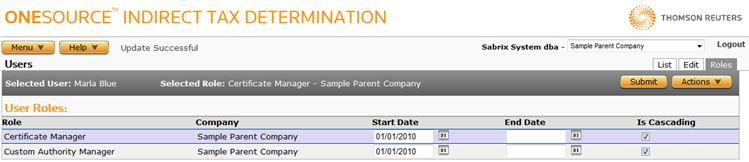
The actions on the User Roles page are limited based on user and role privileges:
- If you are logged in as the ^dba user, you can perform all actions on this page for any user, with the exception of detaching the User Administrator or Sabrix System DBA roles from yourself.
- If you are logged in as any other user that has the User Administration role, you can perform all actions on this page for any user except yourself.
- If you are logged in as a user that does not have one of these roles, you can view, but not modify, user role data.
Attach a role to the selected user
- Select Attach Role from the Actions menu.
- Select and enter role information using the field reference below.
- Click Submit to save the role.
Detach a role from the selected user
- Click the role you want to detach.
- Select Detach Role from the Actions menu.
- Click OK to confirm the detachment.
Edit a user role
- Modify the start/end dates and cascading status as desired.
- Click Submit to save your changes.
|
User Roles Field Reference |
||
|---|---|---|
|
Field |
Req? |
Description |
|
Role |
Y |
The name of the user's role. Default roles are provided by ONESOURCE Indirect Tax Determination; your dba may have also created new roles. |
|
Company |
Y |
The company for which the user has the role. |
|
Start Date |
Y |
The start date for the role (when it becomes effective), in MM/DD/YYYY format. |
|
End Date |
Opt. |
The end date for the role (when it is deactivated), in MM/DD/YYYY format. |
|
Is Cascading |
Y |
The checkbox is unselected by default. When checked, the user has this role for all child companies of the selected company. Unchecked, you must specifically grant this role to this user for child companies. |